Instrument Functions
Fragment manuala — str. 35–38
📋 Tekst do skopiowania / wyszukiwania
FEATURES
ET3P61043
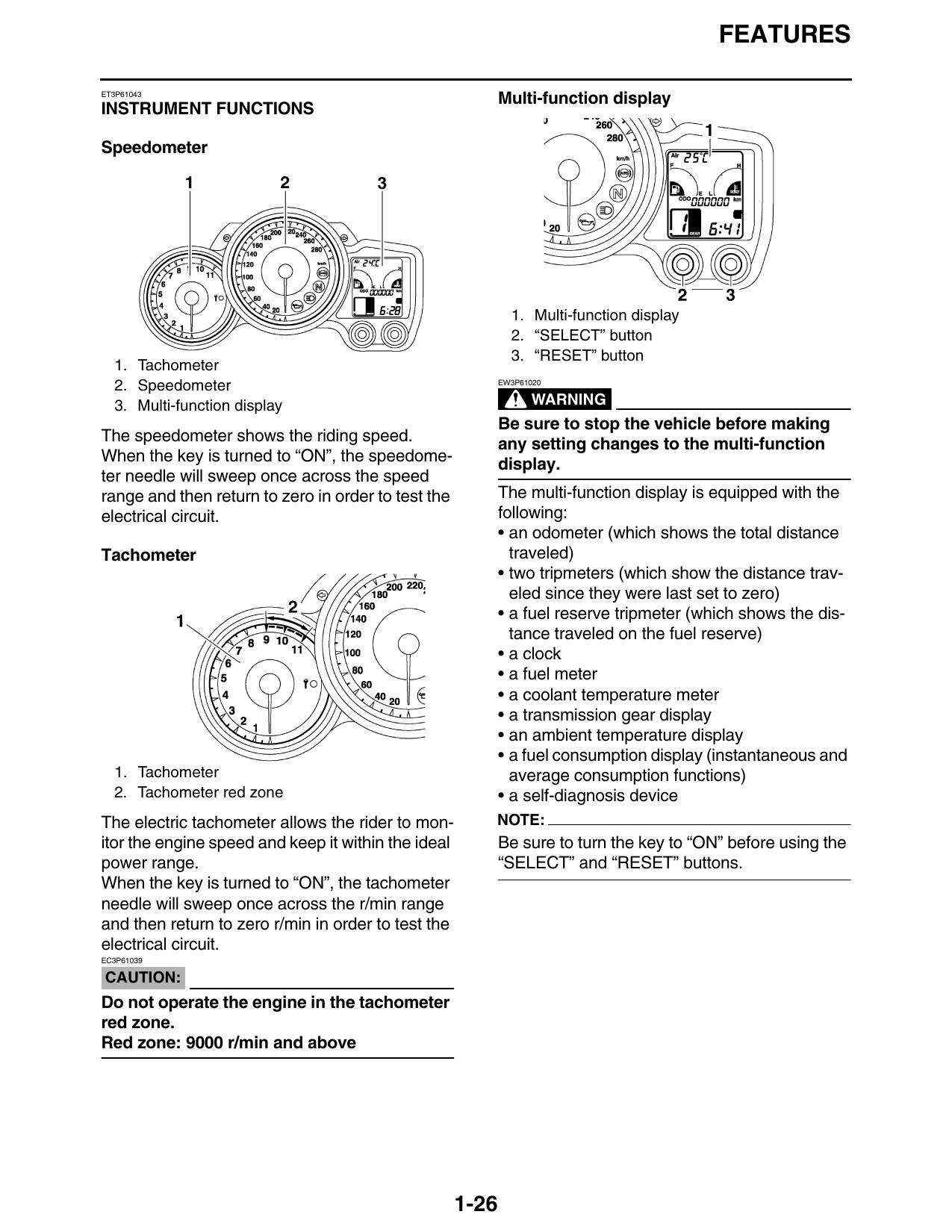
Multi-function display
INSTRUMENT FUNCTIONS
Speedometer
1. Multi-function display
2. “SELECT” button
3. “RESET” button
1. Tachometer
2. Speedometer EW3P61020
3. Multi-function display WARNING
Be sure to stop the vehicle before making
The speedometer shows the riding speed. any setting changes to the multi-function
When the key is turned to “ON”, the speedome- display.
ter needle will sweep once across the speed
range and then return to zero in order to test the The multi-function display is equipped with the
electrical circuit. following:
• an odometer (which shows the total distance
Tachometer traveled)
• two tripmeters (which show the distance trav-
eled since they were last set to zero)
• a fuel reserve tripmeter (which shows the dis-
tance traveled on the fuel reserve)
• a clock
• a fuel meter
• a coolant temperature meter
• a transmission gear display
• an ambient temperature display
• a fuel consumption display (instantaneous and
1. Tachometer average consumption functions)
2. Tachometer red zone • a self-diagnosis device
The electric tachometer allows the rider to mon- NOTE:
itor the engine speed and keep it within the ideal Be sure to turn the key to “ON” before using the
power range. “SELECT” and “RESET” buttons.
When the key is turned to “ON”, the tachometer
needle will sweep once across the r/min range
and then return to zero r/min in order to test the
electrical circuit.
EC3P61039
CAUTION:
Do not operate the engine in the tachometer
red zone.
Red zone: 9000 r/min and above
1-26
FEATURES
Odometer and tripmeter modes Clock
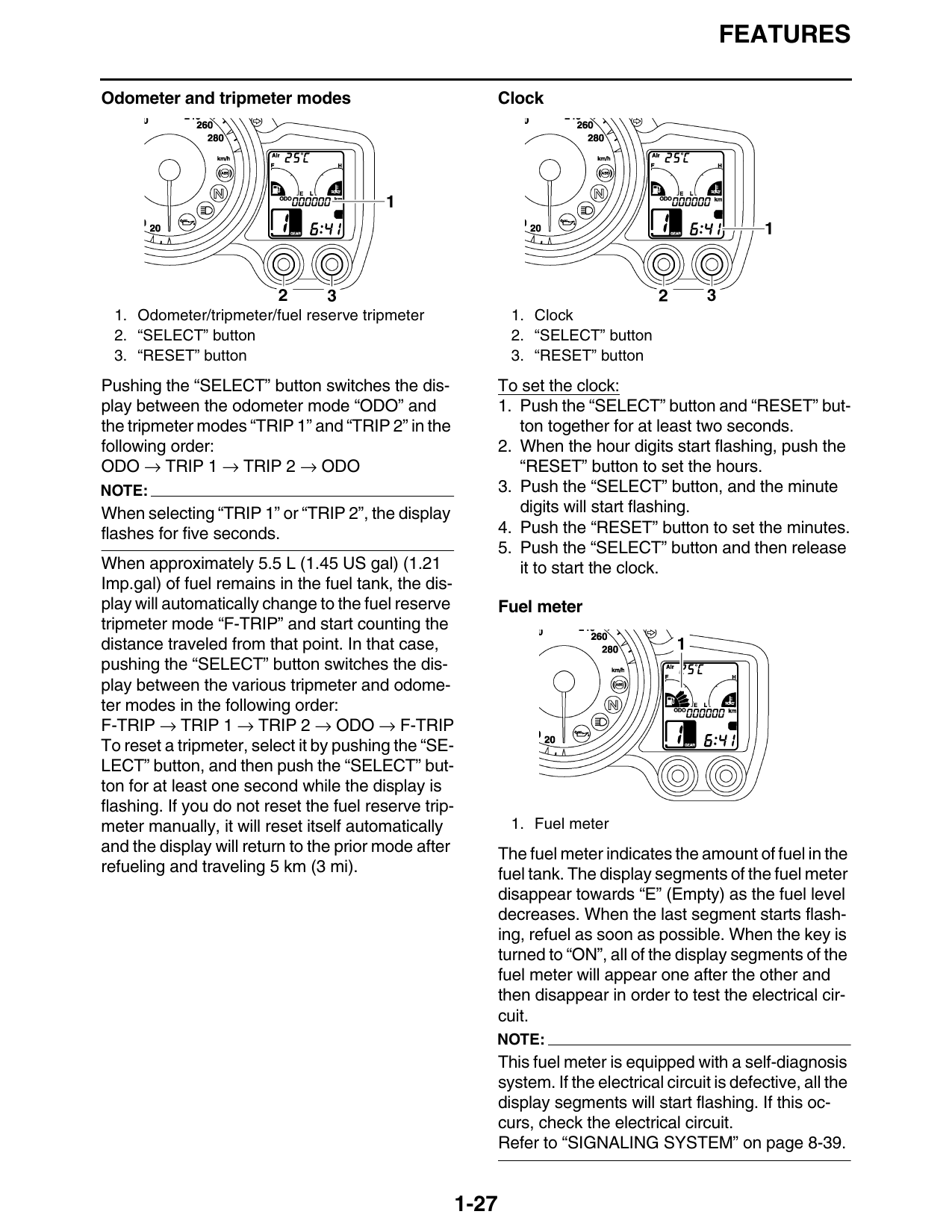
1. Odometer/tripmeter/fuel reserve tripmeter 1. Clock
2. “SELECT” button 2. “SELECT” button
3. “RESET” button 3. “RESET” button
Pushing the “SELECT” button switches the dis- To set the clock:
play between the odometer mode “ODO” and 1. Push the “SELECT” button and “RESET” but-
the tripmeter modes “TRIP 1” and “TRIP 2” in the ton together for at least two seconds.
following order: 2. When the hour digits start flashing, push the
ODO → TRIP 1 → TRIP 2 → ODO “RESET” button to set the hours.
NOTE: 3. Push the “SELECT” button, and the minute
When selecting “TRIP 1” or “TRIP 2”, the display digits will start flashing.
flashes for five seconds. 4. Push the “RESET” button to set the minutes.
5. Push the “SELECT” button and then release
When approximately 5.5 L (1.45 US gal) (1.21 it to start the clock.
Imp.gal) of fuel remains in the fuel tank, the dis-
play will automatically change to the fuel reserve Fuel meter
tripmeter mode “F-TRIP” and start counting the
distance traveled from that point. In that case,
pushing the “SELECT” button switches the dis-
play between the various tripmeter and odome-
ter modes in the following order:
F-TRIP → TRIP 1 → TRIP 2 → ODO → F-TRIP
To reset a tripmeter, select it by pushing the “SE-
LECT” button, and then push the “SELECT” but-
ton for at least one second while the display is
flashing. If you do not reset the fuel reserve trip-
meter manually, it will reset itself automatically 1. Fuel meter
and the display will return to the prior mode after The fuel meter indicates the amount of fuel in the
refueling and traveling 5 km (3 mi). fuel tank. The display segments of the fuel meter
disappear towards “E” (Empty) as the fuel level
decreases. When the last segment starts flash-
ing, refuel as soon as possible. When the key is
turned to “ON”, all of the display segments of the
fuel meter will appear one after the other and
then disappear in order to test the electrical cir-
cuit.
NOTE:
This fuel meter is equipped with a self-diagnosis
system. If the electrical circuit is defective, all the
display segments will start flashing. If this oc-
curs, check the electrical circuit.
Refer to “SIGNALING SYSTEM” on page 8-39.
1-27
FEATURES
Coolant temperature meter Ambient temperature, instantaneous fuel
consumption and average fuel consumption
modes
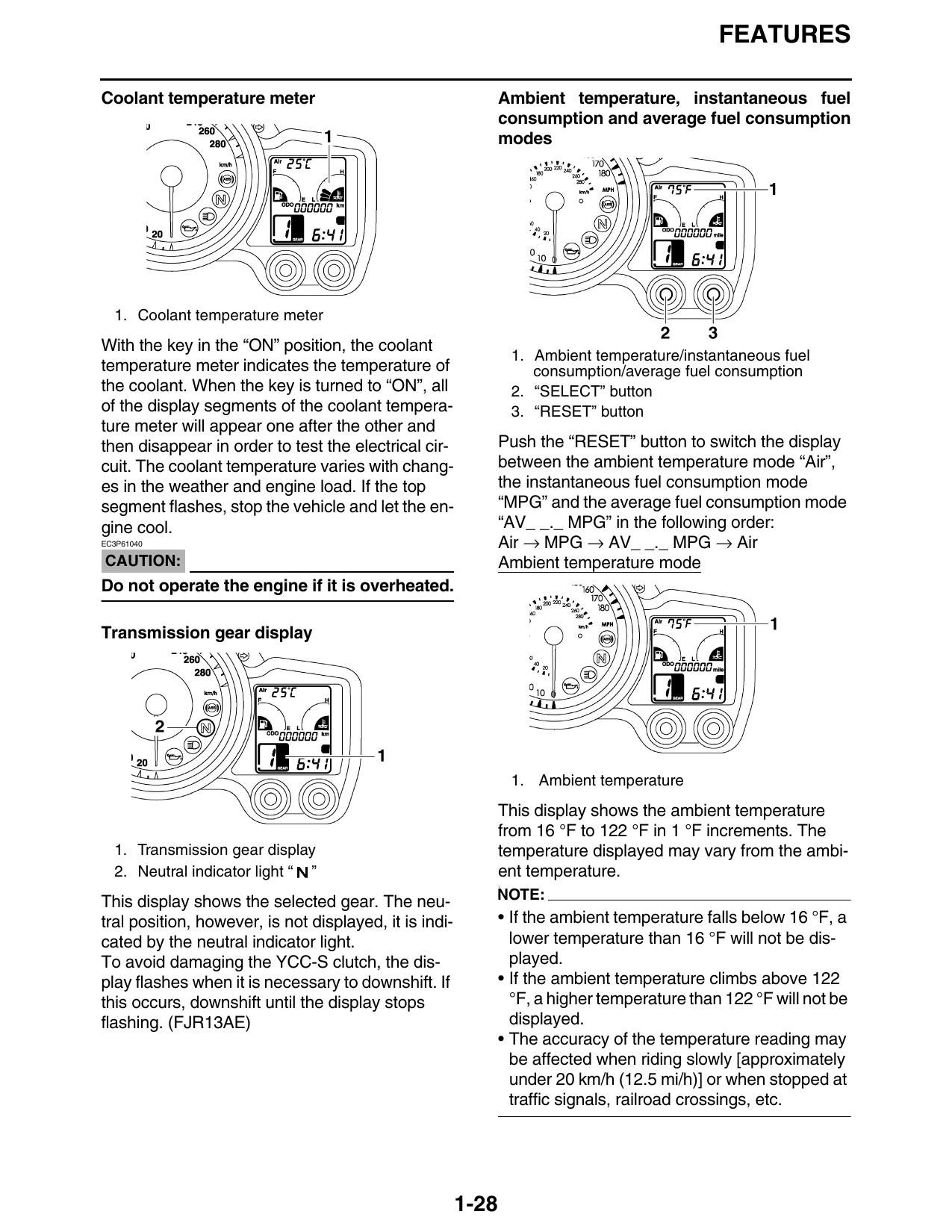
1. Coolant temperature meter
With the key in the “ON” position, the coolant
1. Ambient temperature/instantaneous fuel
temperature meter indicates the temperature of consumption/average fuel consumption
the coolant. When the key is turned to “ON”, all 2. “SELECT” button
of the display segments of the coolant tempera- 3. “RESET” button
ture meter will appear one after the other and
then disappear in order to test the electrical cir- Push the “RESET” button to switch the display
cuit. The coolant temperature varies with chang- between the ambient temperature mode “Air”,
es in the weather and engine load. If the top the instantaneous fuel consumption mode
segment flashes, stop the vehicle and let the en- “MPG” and the average fuel consumption mode
gine cool. “AV_ _._ MPG” in the following order:
EC3P61040 Air → MPG → AV_ _._ MPG → Air
CAUTION: Ambient temperature mode
Do not operate the engine if it is overheated.
Transmission gear display
1. Ambient temperature
This display shows the ambient temperature
from 16 °F to 122 °F in 1 °F increments. The
1. Transmission gear display temperature displayed may vary from the ambi-
2. Neutral indicator light “ ” ent temperature.
1.
This display shows the selected gear. The neu- NOTE:
tral position, however, is not displayed, it is indi- • If the ambient temperature falls below 16 °F, a
cated by the neutral indicator light. lower temperature than 16 °F will not be dis-
To avoid damaging the YCC-S clutch, the dis- played.
play flashes when it is necessary to downshift. If • If the ambient temperature climbs above 122
this occurs, downshift until the display stops °F, a higher temperature than 122 °F will not be
flashing. (FJR13AE) displayed.
• The accuracy of the temperature reading may
be affected when riding slowly [approximately
under 20 km/h (12.5 mi/h)] or when stopped at
traffic signals, railroad crossings, etc.
1-28
FEATURES
Instantaneous fuel consumption mode Self-diagnosis device
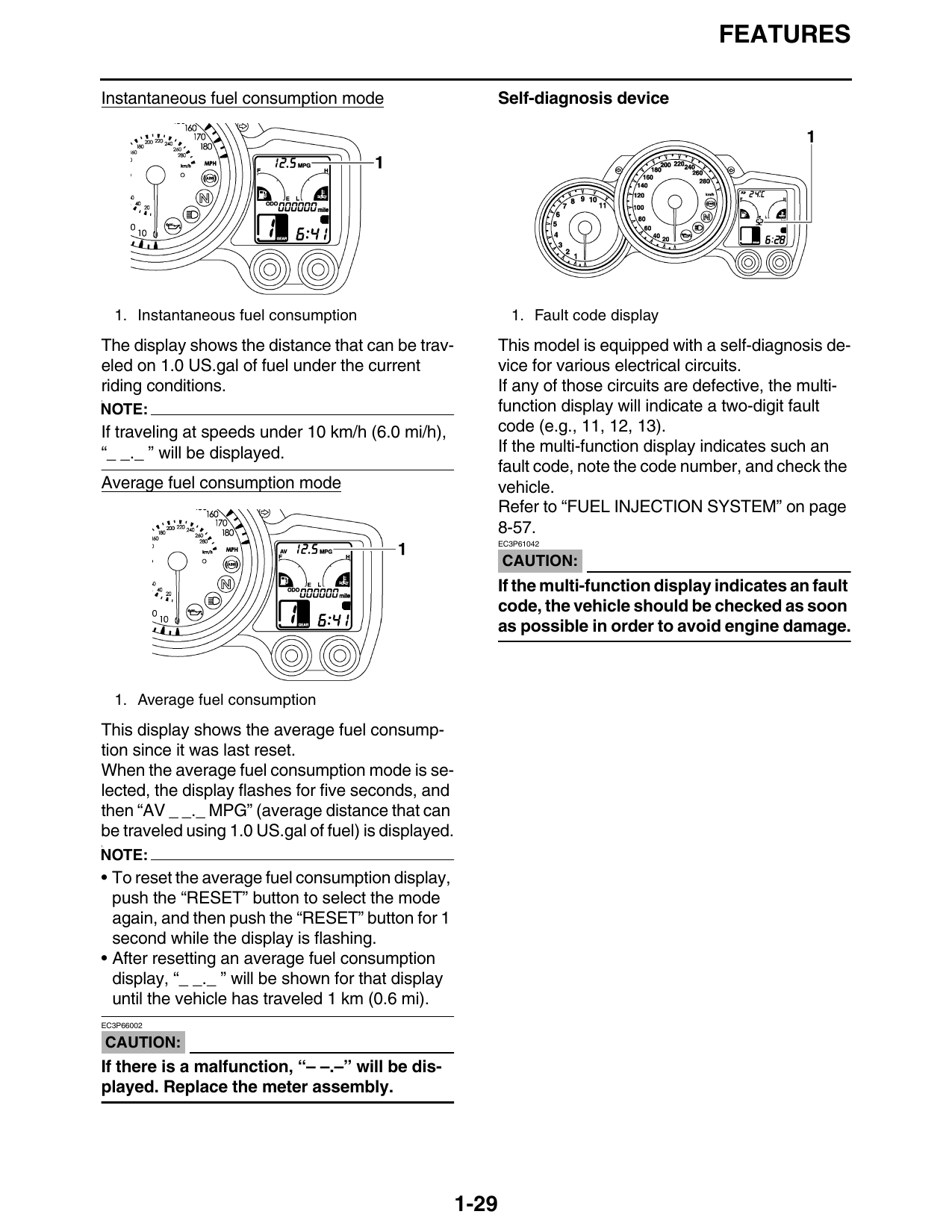
1. Instantaneous fuel consumption 1. Fault code display
The display shows the distance that can be trav- This model is equipped with a self-diagnosis de-
eled on 1.0 US.gal of fuel under the current vice for various electrical circuits.
riding conditions. If any of those circuits are defective, the multi-
function display will indicate a two-digit fault
1.
NOTE:
If traveling at speeds under 10 km/h (6.0 mi/h), code (e.g., 11, 12, 13).
“_ _._ ” will be displayed. If the multi-function display indicates such an
fault code, note the code number, and check the
Average fuel consumption mode vehicle.
Refer to “FUEL INJECTION SYSTEM” on page
8-57.
EC3P61042
CAUTION:
If the multi-function display indicates an fault
code, the vehicle should be checked as soon
as possible in order to avoid engine damage.
1. Average fuel consumption
This display shows the average fuel consump-
tion since it was last reset.
When the average fuel consumption mode is se-
lected, the display flashes for five seconds, and
then “AV _ _._ MPG” (average distance that can
be traveled using 1.0 US.gal of fuel) is displayed.
1.
NOTE:
• To reset the average fuel consumption display,
push the “RESET” button to select the mode
again, and then push the “RESET” button for 1
second while the display is flashing.
• After resetting an average fuel consumption
display, “_ _._ ” will be shown for that display
until the vehicle has traveled 1 km (0.6 mi).
EC3P66002
CAUTION:
If there is a malfunction, “– –.–” will be dis-
played. Replace the meter assembly.
1-29