Checking The Balancers
Fragment manuala — str. 430
📋 Tekst do skopiowania / wyszukiwania
BALANCERS

EAS26120
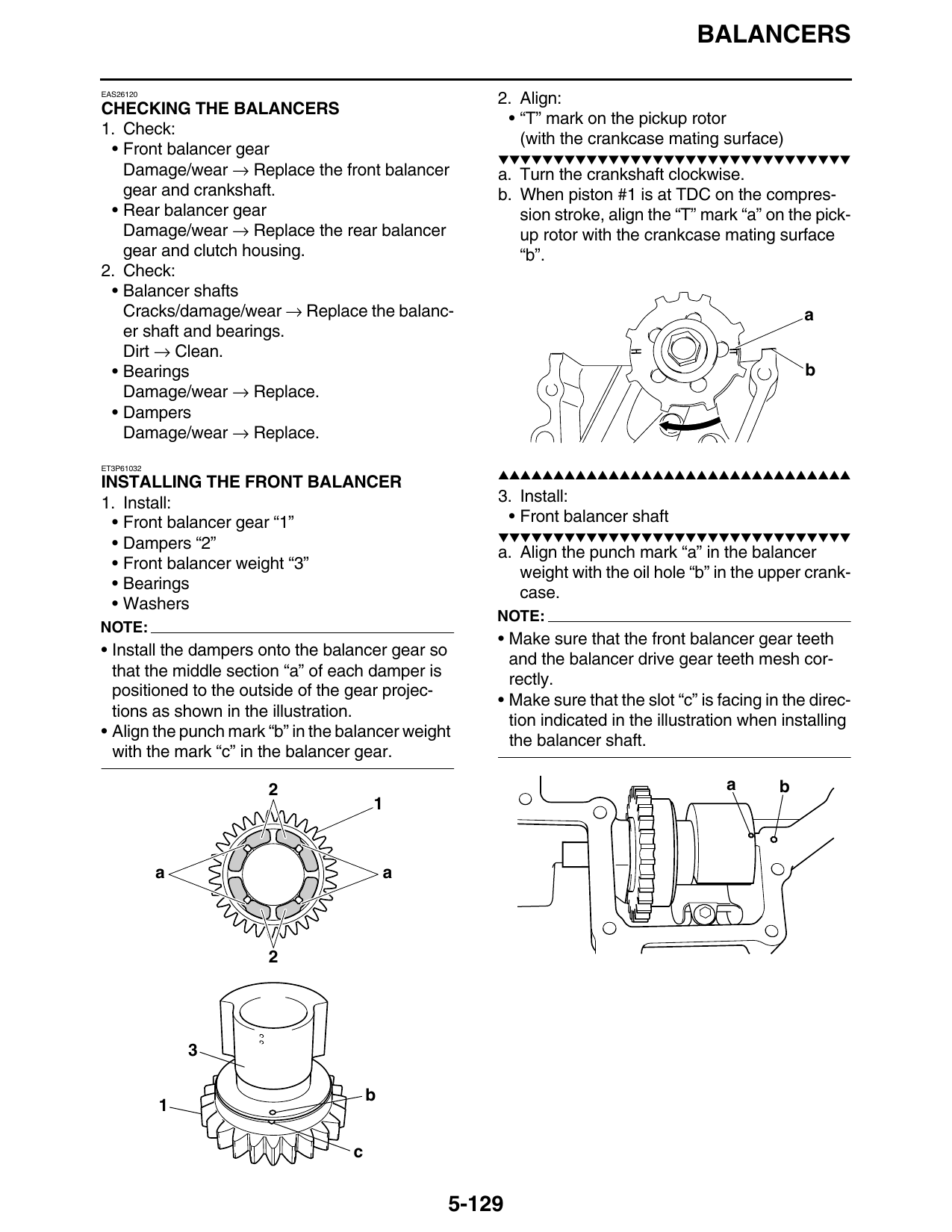
                                                    2. Align:
CHECKING THE BALANCERS
                                                     • “T” mark on the pickup rotor
1. Check:
                                                       (with the crankcase mating surface)
 • Front balancer gear
                                                    ▼▼▼▼▼▼▼▼▼▼▼▼▼▼▼▼▼▼▼▼▼▼▼▼▼▼▼▼▼▼▼▼
   Damage/wear → Replace the front balancer         a. Turn the crankshaft clockwise.
   gear and crankshaft.                             b. When piston #1 is at TDC on the compres-
 • Rear balancer gear                                  sion stroke, align the “T” mark “a” on the pick-
   Damage/wear → Replace the rear balancer             up rotor with the crankcase mating surface
   gear and clutch housing.                            “b”.
2. Check:
 • Balancer shafts
   Cracks/damage/wear → Replace the balanc-                                                       a
   er shaft and bearings.
   Dirt → Clean.
 • Bearings                                                                                       b
   Damage/wear → Replace.
 • Dampers
   Damage/wear → Replace.
ET3P61032
                                                    ▲▲▲▲▲▲▲▲▲▲▲▲▲▲▲▲▲▲▲▲▲▲▲▲▲▲▲▲▲▲▲▲
INSTALLING THE FRONT BALANCER
1. Install:                                         3. Install:
  • Front balancer gear “1”                          • Front balancer shaft
                                                    ▼▼▼▼▼▼▼▼▼▼▼▼▼▼▼▼▼▼▼▼▼▼▼▼▼▼▼▼▼▼▼▼
  • Dampers “2”
                                                    a. Align the punch mark “a” in the balancer
  • Front balancer weight “3”
                                                       weight with the oil hole “b” in the upper crank-
  • Bearings
                                                       case.
  • Washers
                                                    NOTE:
NOTE:
                                                    • Make sure that the front balancer gear teeth
• Install the dampers onto the balancer gear so
                                                      and the balancer drive gear teeth mesh cor-
  that the middle section “a” of each damper is
                                                      rectly.
  positioned to the outside of the gear projec-
                                                    • Make sure that the slot “c” is facing in the direc-
  tions as shown in the illustration.
                                                      tion indicated in the illustration when installing
• Align the punch mark “b” in the balancer weight
                                                      the balancer shaft.
  with the mark “c” in the balancer gear.

                       2                                                              a       b

            a                              a

                                       b

                                   c

                                                5-129